Runtime
Sometimes you may want to display information about a build at runtime, for example build number and date, to aid with QA. Build Assistant writes that data during the build, then you read it from player code.
How data is stored
During a build, Build Assistant writes Assets/BuildAssistant/Resources/BuildInfo.json. At runtime that file is loaded as a Resources TextAsset named BuildInfo.
The JSON includes:
| Field | Meaning |
|---|---|
BuildNumber | Config build number, or -buildNumberOverride from batch mode |
BuildDate | Date the build ran (yyyy-MM-dd) |
BuildTime | Time the build ran |
DevelopmentBuild | Whether the platform was set as a development build |
Custom | Dictionary of extra key/value strings |
Custom keys come from BA_InjectBuildInfo, BA_InjectGITDetails, BA_InjectSVNDetails, or BuildAssistantService.AddToInjectedBuildInfo / GetCustomRuntimeBuildProps() on a platform.
Read build info from code
Use RuntimeBuildInfo.Get() from any runtime script. This is the supported way to read the data yourself, for debug overlays, QA labels, or analytics.
RuntimeBuildInfo info = RuntimeBuildInfo.Get();

string buildNumber = info.BuildNumber;
string buildDate = info.BuildDate;
string buildTime = info.BuildTime;
bool development = info.DevelopmentBuild;

string custom = info.GetCustomParam("CUSTOM_KEY");
Get() caches the result. If BuildInfo is missing or invalid, you get empty strings and an empty Custom dictionary rather than null.
The Demo sample includes DisplayBuildNumber, which reads BuildNumber and a CUSTOM_KEY example with RuntimeBuildInfo.Get() and draws them with OnGUI.
Inject custom data
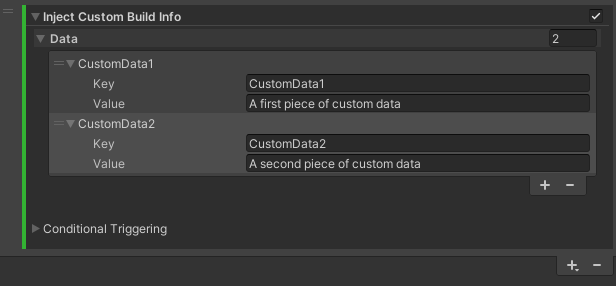
Add BA_InjectBuildInfo as a pre-build action and enter key/value pairs. Those values land in RuntimeBuildInfo.Custom and can be read with GetCustomParam.
BA_InjectSVNDetails and BA_InjectGITDetails inject the following keys:
SVN_BRANCH, SVN_REVISION
GIT_BRANCH, GIT_REVISION
