Logger for Slack
Latest docshttps://samcarey.dev/docs/Unity/build-assistant/Plugins/Build_Assistant_Slack
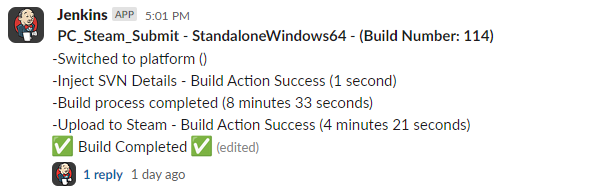
Posts build status using the Slack API.
Install
This plugin is a UPM package. It is not downloaded from this site.
- Open WindowPackage Manager.
- Select My Assets.
- Find Build Assistant Logger for Slack.
- Click Install or Add.
The core package dev.samcarey.buildassistant.core must already be in the project.
Setup
The Slack logger is enabled from Project Settings. You do not add it as an action on a build config.
Create a Slack app
- Open the Slack API apps page and click Create New App.
- Choose Blank app. Name the app and pick the workspace that should receive build logs.
- Open OAuth & Permissions.
- Under Bot Token Scopes, add:
chat:writechat:write.publicfiles:write
- Click Install to Workspace and allow the app.
Add it in Unity
- Open Project SettingsBuild AssistantLogger for Slack.
- Add a workspace: set an ID, Slack Channel ID, and Slack Token.
- Set the default workspace and leave Slack Logger Enabled on.
Usage
The Slack logger sends build progress updates, error notifications, and build reports to your configured Slack channel. Supports multiple workspaces and per-configuration channel routing.
Command-line args
The Slack plugin supports these batch launch argument overrides:
- WithSlackLogger - Enable or disable Slack logger (
trueorfalse) - Agent - Display agent name in Slack logs. Useful when running builds on CI with multiple agents (cosmetic only)
- SlackWorkspace - Use a workspace template set in settings
- SlackToken and SlackChannel - Use a specific token and channel ID (use together as an alternative to SlackWorkspace)
- SlackParentTS - Timestamp returned from the Slack API. If provided, all logs will be placed as a reply to this message. Usually used when running multiple configs (e.g., build configs for each platform)
Use SlackWorkspace, or SlackToken and SlackChannel. Do not mix the two.
-WithSlackLogger true -Agent "CI-Agent-01" -SlackWorkspace "workspace_name"
-WithSlackLogger true -Agent "CI-Agent-01" -SlackToken "xoxb-token" -SlackChannel "channel_id"
Third-party software
Asset uses Newtonsoft.Json under MIT; see Third-Party Notices.txt file in package for details.